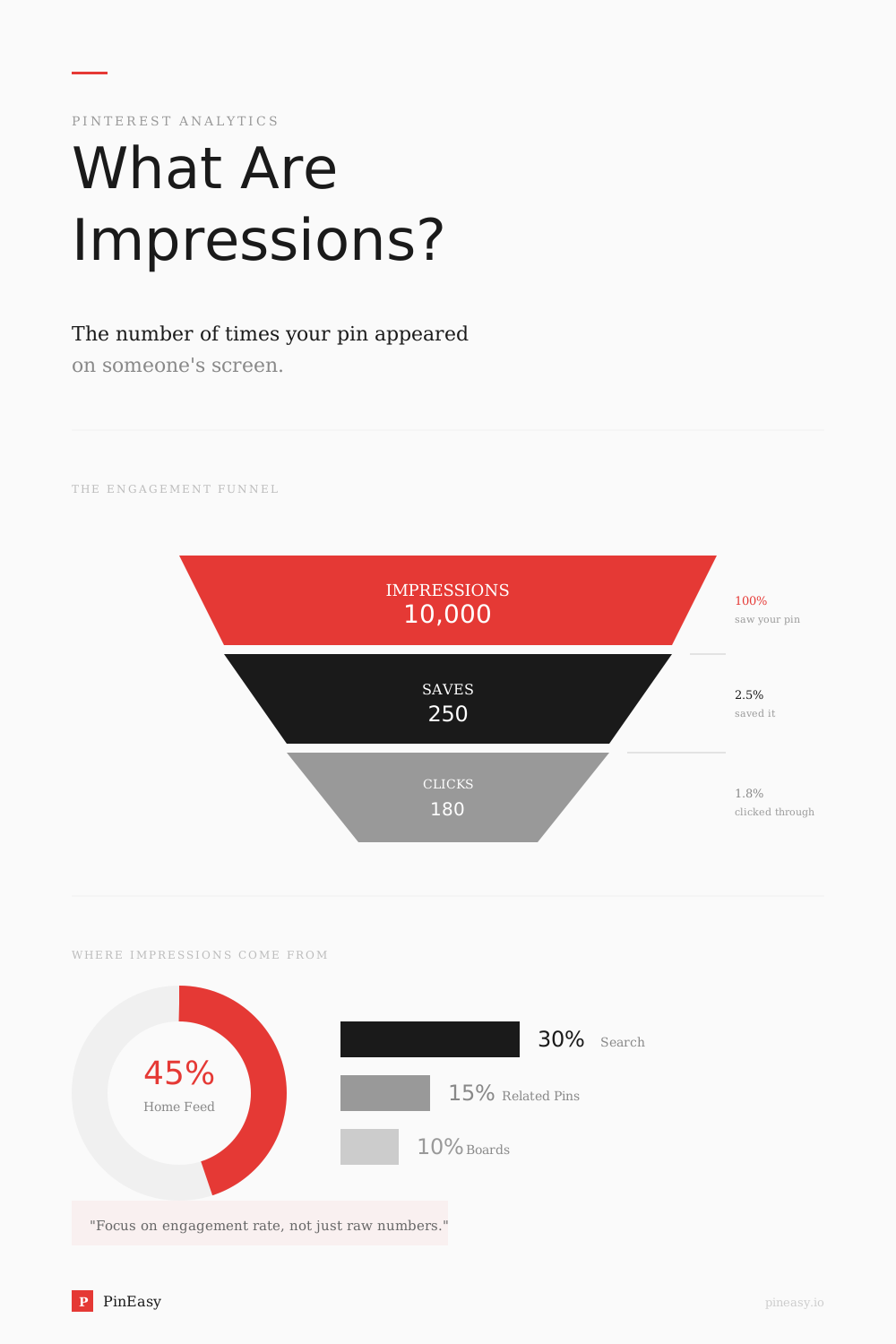
An impression on Pinterest is counted every time your pin appears on someone's screen — whether that's in their home feed, search results, or on another user's board. No click required. If your pin shows up, it counts.
Understanding this number is the first step to growing on Pinterest. In this guide, we'll cover exactly what impressions mean, how they compare to other metrics, what good numbers look like, and how to get more of them.
What Does "Impressions" Mean on Pinterest?
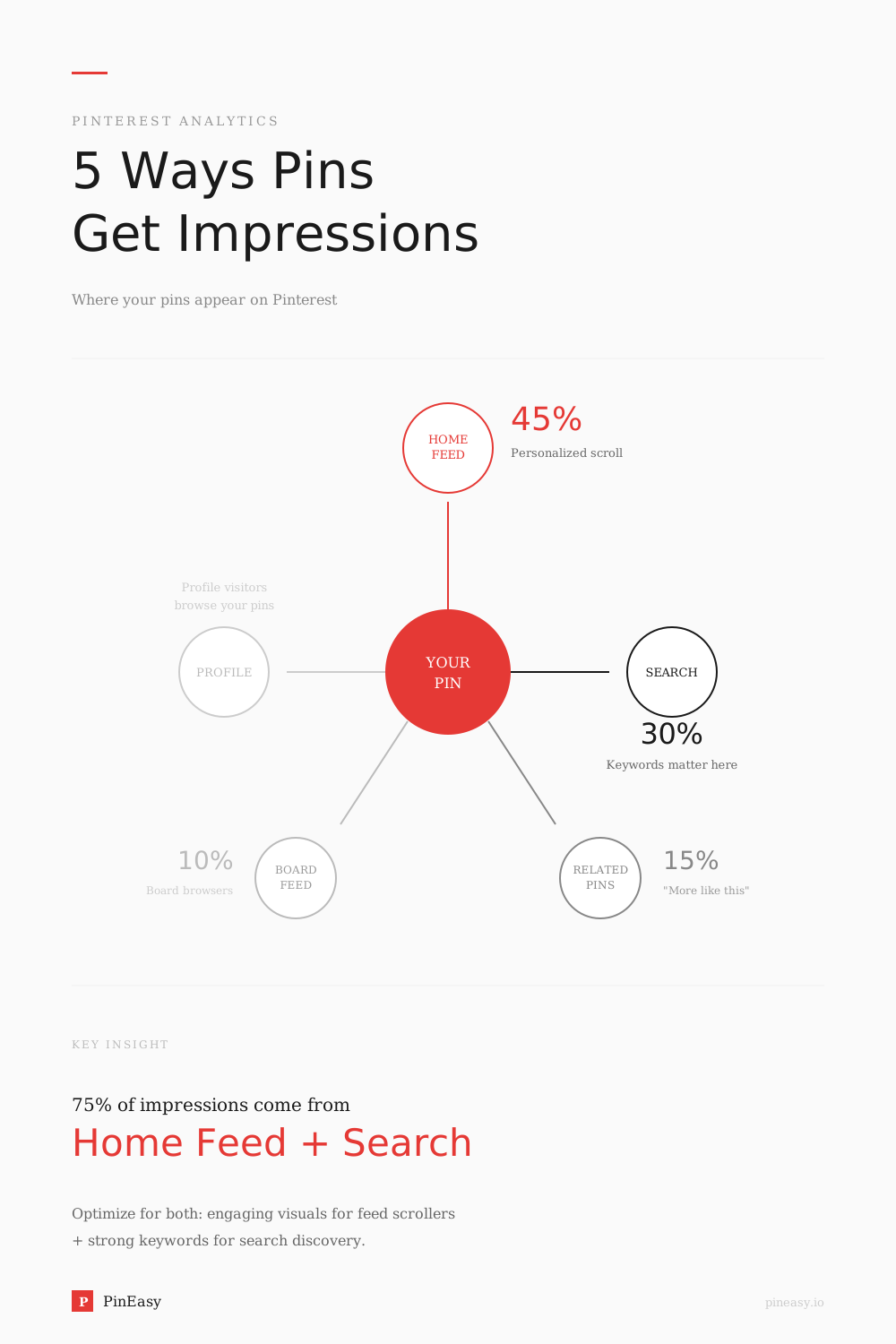
Pinterest defines impressions in its Analytics help as "the number of times your Pins or ads were on screen." Pinterest doesn't provide a complete list of where impressions can happen, but your Pin can appear in places like:
- Home feed — when Pinterest's algorithm shows your pin as someone scrolls
- Search results — when your pin matches a user's search query
- Board browsing — when someone visits a board containing your pin
- Related pins — when your pin appears in the "More like this" section
Important: One user can generate multiple impressions for the same pin. If someone sees your pin in search on Monday and again in their feed on Wednesday, that's two impressions. And unlike clicks or saves, impressions are completely passive — the user doesn't need to interact with your pin at all. These totals do not identify individual viewers; see whether Pinterest shows who viewed your profile for the privacy details.
What Counts Toward Your Pinterest Impressions
Your Pinterest impressions aren't limited to Pins you've created yourself. In Pinterest Analytics, the Organic content type includes Pins created or saved by you, plus Pins created or saved by others that drive people to your claimed website or account.
Individual Pin stats use an additional aggregation rule: Pinterest combines data for Pins that share the same image and, where applicable, a URL. This includes downstream activity when other people save your content.
You can investigate where your impressions come from using these Analytics filters:
- Source: Your Pins shows activity for Pins created or saved by you. Other Pins shows activity for Pins created or saved by others from your claimed website or account.
- Content type: Organic covers unpaid content. Paid and earned covers promoted Pins, including later activity from Pins saved during past campaigns.
- Include saved Pins: This toggle includes Pins you've saved that don't link to your claimed domains.
If your totals seem unexpectedly high, check the Source and Content type filters before assuming every impression came from a Pin you published.
Impressions vs Views vs Engagement — What's the Difference?
These metrics are easy to confuse. Here's how they compare:
| Metric | What It Measures | Requires Action? | Best For |
|---|---|---|---|
| Impressions | Times your pin appeared on screen | No | Measuring visibility |
| Pin Clicks | Clicks to view pin close-up | Yes | Gauging interest |
| Outbound Clicks | Clicks through to your website | Yes | Driving traffic |
| Saves | Times people saved the Pin to a board | Yes | Interest in keeping the idea |
| Video Views | Plays of at least 2 seconds with 50% of the video in view | Partial | Video content reach |
| Total audience | People who have seen or engaged with your Pins | No | Estimating people reached, rather than appearances |
The key distinction: impressions tell you how far your content is spreading. Everything else tells you how well it's performing once seen.
For the close-up metric, see Pin clicks. For a broader comparison, read our guide on Pinterest views vs impressions.
What Is a Good Number of Impressions on Pinterest?
Pinterest does not publish universal monthly impression benchmarks by account age. Compare your own results over similar periods and with consistent filters.
- New accounts: Establish a baseline without assuming a required growth timeline.
- Growing accounts: Compare similar topics and Pin ages.
- Established accounts: Consider seasonality and the mix of organic and paid content.
Use the right rate: Engagement rate is total engagements divided by impressions. Outbound click rate is outbound clicks divided by impressions. These are event counts, not percentages of unique people. A hypothetical Pin with 5,000 impressions and 250 outbound clicks has a 5% outbound click rate; that example is arithmetic, not a performance benchmark.
Where to Find Your Pinterest Impressions
You need a free Pinterest business account to access Analytics. Our guide to converting to a Pinterest business account explains how to switch while keeping your Pins and followers.
Once you have a business account:
- Desktop: Click the menu icon at the top-left, then under Analytics select Overview.
- Mobile: Open your profile, tap the menu at the top-left, then select Analytics.
The Overview page shows the last 30 days by default. You can choose custom date ranges covering the past year and a half. The Use real-time estimates toggle can include data from the last 48 hours, although real-time reporting isn't available for audience metrics or when certain filters are applied.
To check a single Pin, click your profile picture, select Created, choose the Pin, then click See more stats. In the app, open your profile, select Created, choose a Pin and tap Pin Stats below it. Pinterest says Pin stats update mostly in real time, so the numbers may differ from those in Pinterest Analytics.
Why Are My Pinterest Impressions Low?
Low impressions alone do not identify the cause. Check these possibilities:
- Reporting scope: Confirm the account, date range, and organic/paid filters.
- Content relevance: Make the image, copy, and destination agree. Review keyword placement.
- Image quality: Check clarity and readability; Pinterest recommends a 2:3 image ratio.
- Publishing habits: Pinterest recommends original content weekly, not a universal daily quota.
- Pin age and season: There is no fixed engagement window or guaranteed account warm-up period.
If the number is not low but missing entirely — empty charts, or no Analytics at all — that is a reporting question rather than a reach one. Work through why Pinterest Analytics is not working before changing anything about your Pins.
Why Are My Pinterest Impressions Dropping?
A sudden drop does not establish an algorithm penalty or a recovery deadline:
- Seasonality: Check interest in the topic and region.
- Recent estimates: Pinterest says real-time figures are estimates that can decrease. Compare complete periods using consistent Source, Content type and Include saved Pins settings.
- Creative and destination: Check for broken links, mismatched copy, and repetitive uploads.
- Publishing changes: Record your cadence, but do not assume a break proves a penalty.
Pinterest Monthly Views vs Impressions
You may see a monthly views figure on a Pinterest profile, but Pinterest's current Analytics help doesn't define that profile metric or explain how it relates to impressions. Don't assume the two numbers are interchangeable.
For a clearer comparison, use Pinterest Analytics:
- Impressions: The number of times your Pins or ads were on screen.
- Total audience: The number of people who have seen or engaged with your Pins.
Pinterest's reviewed Analytics documentation doesn't provide a universal benchmark for good monthly views. Compare your own impressions, total audience and outbound clicks over similar, complete reporting periods instead.
How to Increase Pinterest Impressions
These are practical checks, not guaranteed impression increases:
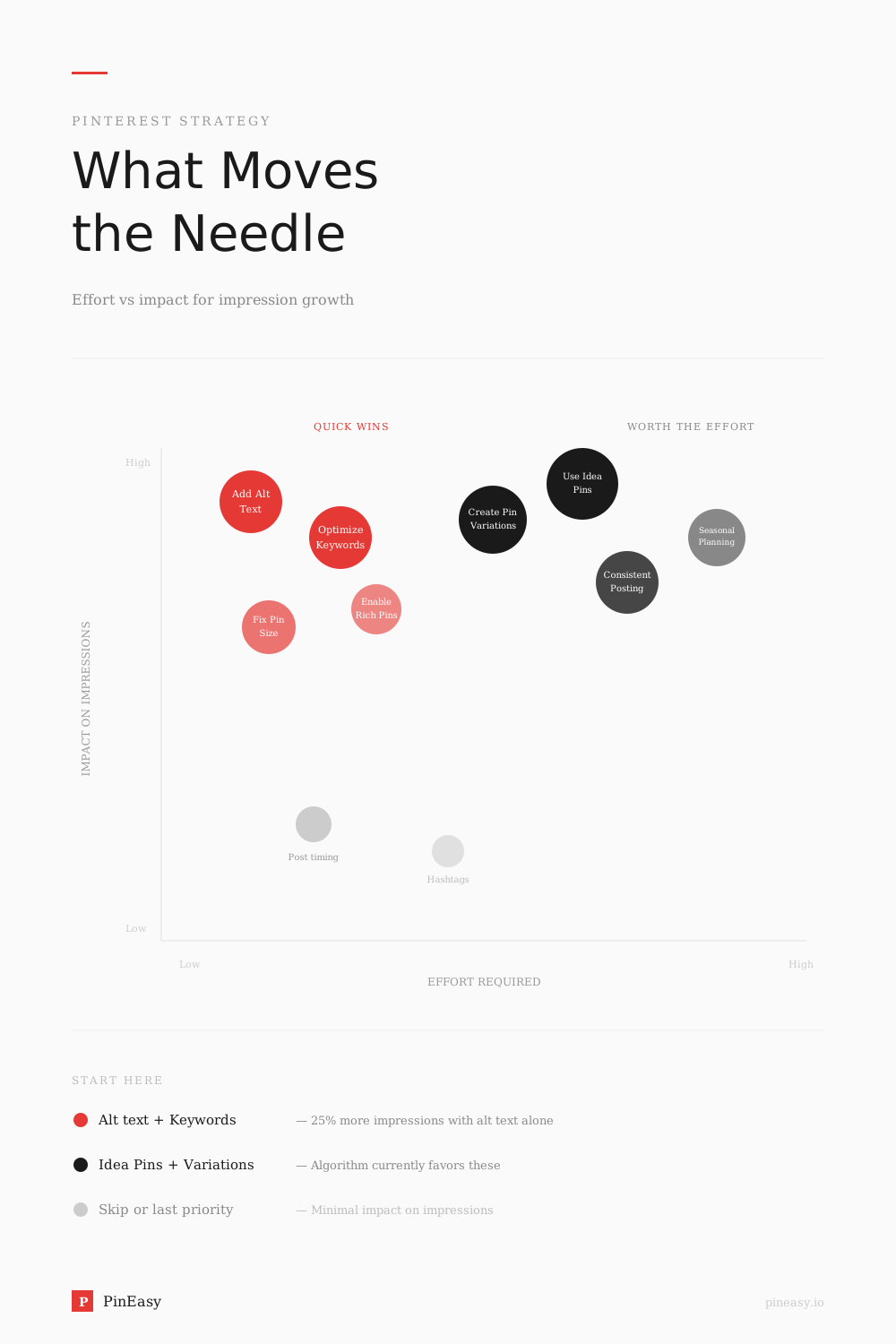
- Use keyword-rich titles and descriptions. Put your primary keyword early in your title. Write natural, descriptive text rather than keyword-stuffed lists. Check our most searched Pinterest keywords guide for research.
- Test publishing windows. Record times and compare results at similar Pin ages. Pinterest does not promise a fixed timing boost. See our posting-time testing guide.
- Create distinct Pin variations. Try different useful images or angles for one destination without repeatedly uploading duplicates.
- Use Rich Pins where appropriate. They synchronize supported details from your website. Pinterest’s Rich Pin guidance does not promise a distribution advantage.
- Claim your website. Claiming supports attribution and website-related analytics; the help page does not promise a ranking boost.
- Write alt text for accessibility. Describe the image for screen readers. Pinterest’s alt text guidance does not establish a reach benefit.
FAQ
What is a good number of impressions on Pinterest?
Pinterest does not publish a universal monthly benchmark by account age. Compare similar periods in your own account and review saves and outbound clicks alongside impressions.
What does 1 impression mean on Pinterest?
One impression means your pin appeared on one user's screen one time. It could be in their home feed, search results, or while browsing a board. No click or interaction is required — just visibility.
What is the difference between impressions and views on Pinterest?
Impressions count appearances on screen. Pin clicks open a Pin in close-up; video views require at least 2 seconds with 50% of the video in view. Use the exact metric name instead of treating all views as Pin clicks.
Are impressions important on Pinterest?
Yes — impressions are the foundation metric. Without visibility, you can't get saves, clicks, or website traffic. However, impressions alone don't drive results. What matters is the combination of high impressions and strong engagement (saves and clicks).
Do my own views count as impressions on Pinterest?
Pinterest's current Analytics help doesn't explicitly say whether an account owner's own views count as impressions. It defines impressions as the number of times your Pins or ads were on screen, without specifying an exclusion for self-views. Don't treat early impressions on a new account as proof of external reach. Compare complete reporting periods and review saves and outbound clicks alongside impressions.
Why are my Pinterest impressions higher than my Pins can explain?
Your Analytics totals can include Pins other people created or saved from your claimed website or account. Pinterest also aggregates individual Pin stats across Pins sharing the same image and, where applicable, a URL. Check the Source filter to distinguish Your Pins from Other Pins, and use consistent reporting filters when comparing totals.
How many monthly views on Pinterest is good?
Pinterest's current Analytics help doesn't define profile monthly views or provide a universal benchmark for them. Rather than targeting an unsupported number, compare your impressions and total audience across similar complete periods, alongside saves and outbound clicks.
Sources
- Pinterest Help Center — Analytics Overview — Official documentation on Pinterest analytics and impression counting
- Pinterest Help Center — Review your Pin stats — Official metric definitions, Pin-stat aggregation and reporting differences between Pin stats and Pinterest Analytics
- Pinterest Business — Creative best practices — Pinterest's creative tips for Pins and ads: vertical formats, concise messaging and clear branding
- Pinterest distribution guidance — Official content and troubleshooting guidance
Related Articles
- How to Compare Pinterest Pins — Choose the right metric and compare counts with rates
- Pinterest Views vs Impressions — Understanding the key difference between these metrics
- How to Get More Impressions on Pinterest — Detailed strategies to boost your visibility
- Best Time to Post on Pinterest — Optimize your posting schedule for maximum reach